Instructions to use zai-org/WebVIA-Agent with libraries, inference providers, notebooks, and local apps. Follow these links to get started.
- Libraries
- Transformers
How to use zai-org/WebVIA-Agent with Transformers:
# Use a pipeline as a high-level helper from transformers import pipeline pipe = pipeline("image-text-to-text", model="zai-org/WebVIA-Agent") messages = [ { "role": "user", "content": [ {"type": "image", "url": "https://huggingface.co/datasets/huggingface/documentation-images/resolve/main/p-blog/candy.JPG"}, {"type": "text", "text": "What animal is on the candy?"} ] }, ] pipe(text=messages)# Load model directly from transformers import AutoProcessor, AutoModelForImageTextToText processor = AutoProcessor.from_pretrained("zai-org/WebVIA-Agent") model = AutoModelForImageTextToText.from_pretrained("zai-org/WebVIA-Agent") messages = [ { "role": "user", "content": [ {"type": "image", "url": "https://huggingface.co/datasets/huggingface/documentation-images/resolve/main/p-blog/candy.JPG"}, {"type": "text", "text": "What animal is on the candy?"} ] }, ] inputs = processor.apply_chat_template( messages, add_generation_prompt=True, tokenize=True, return_dict=True, return_tensors="pt", ).to(model.device) outputs = model.generate(**inputs, max_new_tokens=40) print(processor.decode(outputs[0][inputs["input_ids"].shape[-1]:])) - Notebooks
- Google Colab
- Kaggle
- Local Apps
- vLLM
How to use zai-org/WebVIA-Agent with vLLM:
Install from pip and serve model
# Install vLLM from pip: pip install vllm # Start the vLLM server: vllm serve "zai-org/WebVIA-Agent" # Call the server using curl (OpenAI-compatible API): curl -X POST "http://localhost:8000/v1/chat/completions" \ -H "Content-Type: application/json" \ --data '{ "model": "zai-org/WebVIA-Agent", "messages": [ { "role": "user", "content": [ { "type": "text", "text": "Describe this image in one sentence." }, { "type": "image_url", "image_url": { "url": "https://cdn.britannica.com/61/93061-050-99147DCE/Statue-of-Liberty-Island-New-York-Bay.jpg" } } ] } ] }'Use Docker
docker model run hf.co/zai-org/WebVIA-Agent
- SGLang
How to use zai-org/WebVIA-Agent with SGLang:
Install from pip and serve model
# Install SGLang from pip: pip install sglang # Start the SGLang server: python3 -m sglang.launch_server \ --model-path "zai-org/WebVIA-Agent" \ --host 0.0.0.0 \ --port 30000 # Call the server using curl (OpenAI-compatible API): curl -X POST "http://localhost:30000/v1/chat/completions" \ -H "Content-Type: application/json" \ --data '{ "model": "zai-org/WebVIA-Agent", "messages": [ { "role": "user", "content": [ { "type": "text", "text": "Describe this image in one sentence." }, { "type": "image_url", "image_url": { "url": "https://cdn.britannica.com/61/93061-050-99147DCE/Statue-of-Liberty-Island-New-York-Bay.jpg" } } ] } ] }'Use Docker images
docker run --gpus all \ --shm-size 32g \ -p 30000:30000 \ -v ~/.cache/huggingface:/root/.cache/huggingface \ --env "HF_TOKEN=<secret>" \ --ipc=host \ lmsysorg/sglang:latest \ python3 -m sglang.launch_server \ --model-path "zai-org/WebVIA-Agent" \ --host 0.0.0.0 \ --port 30000 # Call the server using curl (OpenAI-compatible API): curl -X POST "http://localhost:30000/v1/chat/completions" \ -H "Content-Type: application/json" \ --data '{ "model": "zai-org/WebVIA-Agent", "messages": [ { "role": "user", "content": [ { "type": "text", "text": "Describe this image in one sentence." }, { "type": "image_url", "image_url": { "url": "https://cdn.britannica.com/61/93061-050-99147DCE/Statue-of-Liberty-Island-New-York-Bay.jpg" } } ] } ] }' - Docker Model Runner
How to use zai-org/WebVIA-Agent with Docker Model Runner:
docker model run hf.co/zai-org/WebVIA-Agent
WebVIA: A Web-based Vision-Language Agentic Framework for Interactive and Verifiable UI-to-Code Generation
- Repository: https://github.com/zheny2751-dotcom/WebVIA
- Paper: https://arxiv.org/pdf/2511.06251
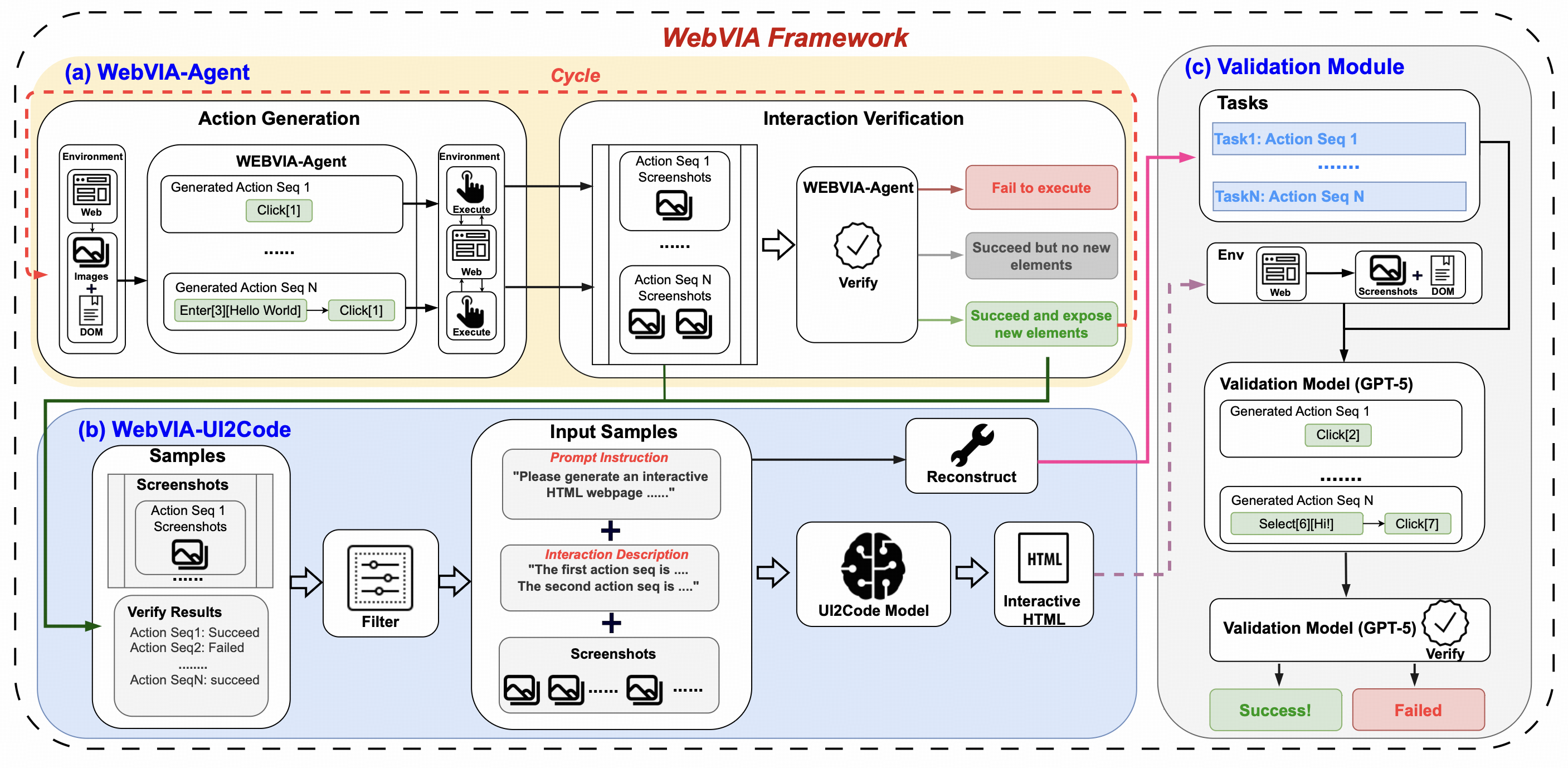
WebVIA is the first agentic framework for interactive and verifiable UI-to-Code generation. While prior vision-language models only produce static HTML/CSS layouts, WebVIA enables executable and interactive web interfaces. The framework consists of three modules:
- WebVIA-Agent – navigates websites and captures multi-state UI screenshots.
- WebVIA-UI2Code – generates functional HTML/CSS/JavaScript code with interactivity.
- Validation Module – verifies whether the generated UI behaves as expected.
Backbone Model
Our model is built on GLM-4.1V-9B-Base.
Quick Inference
This is a simple example of running single-image inference using the transformers library.
First, install the transformers library:
pip install transformers>=4.57.1
Then, run the following code:
from transformers import AutoProcessor, AutoModelForImageTextToText
import torch
messages = [
{
"role": "user",
"content": [
{
"type": "image",
"url": "https://raw.githubusercontent.com/zheny2751-dotcom/UI2Code-N/main/assets/example.png"
},
{
"type": "text",
"text": "Based on the domtree and the page screenshot, please identify which interactive components in the image require interaction. Please note that if similar buttons have been clicked on similar pages in the past, do not click them again, and also do not select buttons that are obscured on the page."
}
],
}
]
processor = AutoProcessor.from_pretrained("zai-org/WebVIA-Agent")
model = AutoModelForImageTextToText.from_pretrained(
pretrained_model_name_or_path="zai-org/WebVIA-Agent",
torch_dtype=torch.bfloat16,
device_map="auto",
)
inputs = processor.apply_chat_template(
messages,
tokenize=True,
add_generation_prompt=True,
return_dict=True,
return_tensors="pt"
).to(model.device)
generated_ids = model.generate(**inputs, max_new_tokens=16384)
output_text = processor.decode(generated_ids[0][inputs["input_ids"].shape[1]:], skip_special_tokens=False)
print(output_text)
See our Github Repo for more detailed usage.
Citation
If you find our model useful in your work, please cite it with:
@article{xu2025webvia,
title={WebVIA: A Web-based Vision-Language Agentic Framework for Interactive and Verifiable UI-to-Code Generation},
author={Xu, Mingde and Yang, Zhen and Hong, Wenyi and Pan, Lihang and Fan, Xinyue and Wang, Yan and Gu, Xiaotao and Xu, Bin and Tang, Jie},
year={2025},
journal={arXiv preprint arXiv:2511.06251}
}
- Downloads last month
- 103